How to Cancel Candy AI or Delete Your Account (2026 Guide)
How to cancel a Candy AI subscription on the web: My Profile → Settings → Unsubscribe, choose a reason, confirm, and keep access until period end. Plus Delete Account, tokens, refunds and the EverAI charge.

Some links here are affiliate links. If you sign up through them we may earn a commission. It doesn’t change what we say.
You can cancel a Candy AI web subscription yourself in four screens—no paid cancellation-letter service required. We paid $9.99 for Premium on 20 October 2026, cancelled the same day, and kept access until 20 November 2026.
This guide covers the real buttons and warnings we saw, plus the separate Delete Account control and the difference between cancelling and getting a refund. If you are still deciding whether the plan is worth paying for, read my hands-on Candy AI review first.
Cancel vs refund vs delete: three different actions
| What you want | Where to do it | What it does |
|---|---|---|
| Stop the next renewal | My Profile → Settings → Current Plan → Unsubscribe | Stops future renewal while keeping access until the paid period ends. |
| Ask for money back | Candy AI support / the current refund policy | A separate request. Cancelling does not automatically mean a refund. |
| Permanently remove the account | Settings → Danger Zone → Delete account | A permanent account action. Use Unsubscribe first if you only want to stop billing. |
How to cancel a Candy AI subscription on the web
1. Open Settings and choose Unsubscribe
Sign in to Candy AI, open My Profile, then Settings. Under Current Plan, choose the unsubscribe option.
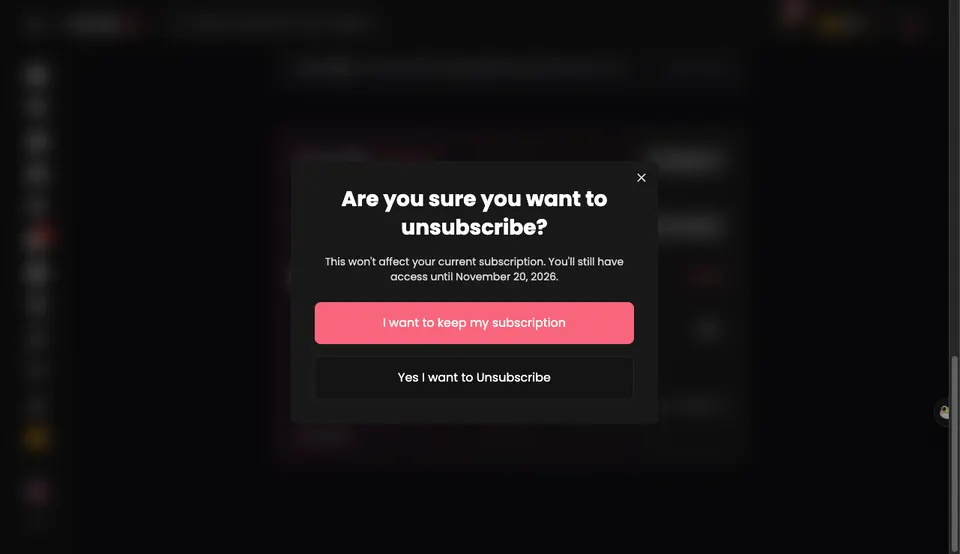
The first dialog asked “Are you sure you want to unsubscribe?” and said the current subscription would not be affected: access would remain until 20 November 2026.
Choose “Yes I want to Unsubscribe” rather than “I want to keep my subscription”.
2. Choose a reason and press Confirm
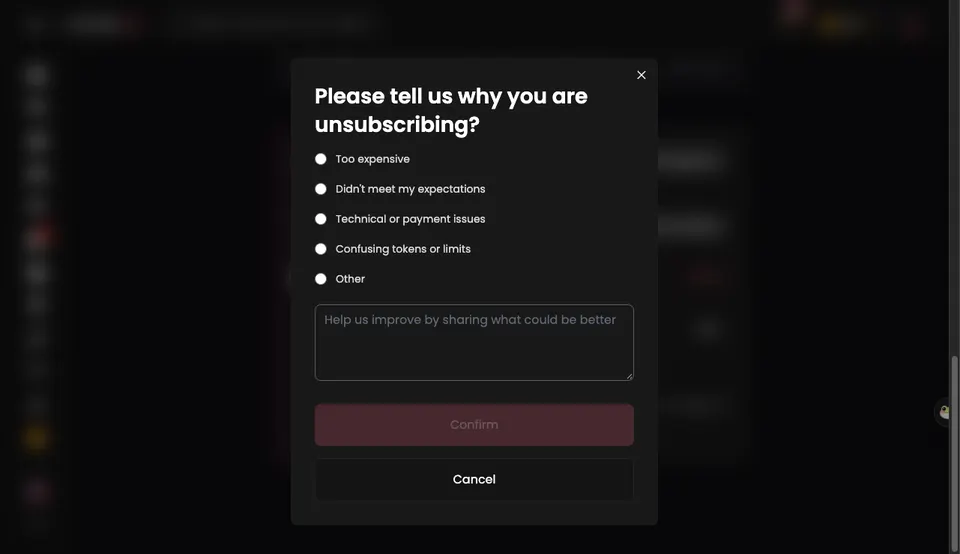
The next screen asked “Please tell us why you are unsubscribing?” The options were:
- Too expensive
- Didn’t meet my expectations
- Technical or payment issues
- Confusing tokens or limits
- Other
A reason is required before Confirm becomes active. There is also an optional text box for details. If you want to back out, the lower Cancel button closes this step.
3. Read the content-loss warning and confirm unsubscribe
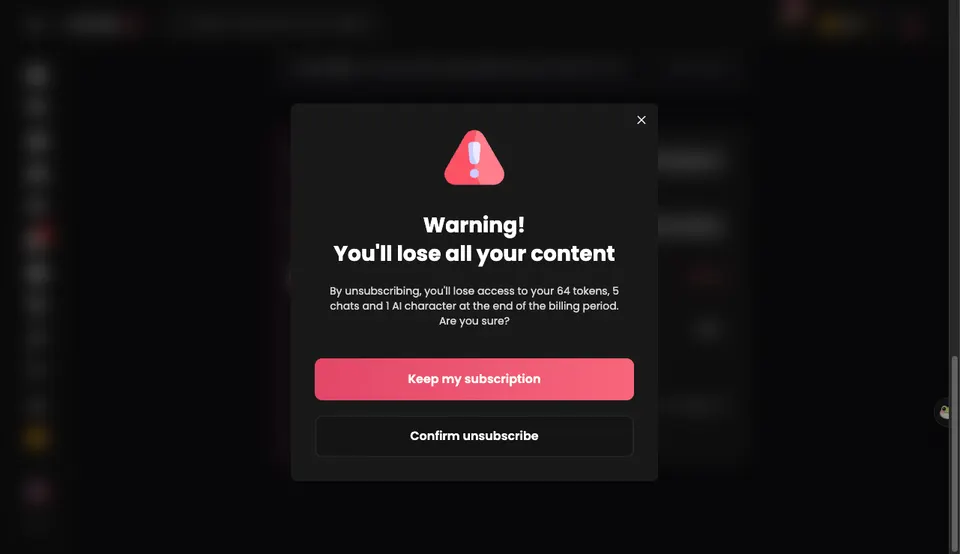
Candy AI then showed a “Warning! You’ll lose all your content” dialog. On my account it named the exact items at stake:
“By unsubscribing, you’ll lose access to your 64 tokens, 5 chats and 1 AI character at the end of the billing period.”
Choose “Confirm unsubscribe” to proceed. The pink “Keep my subscription” button is the retention option.
4. Save the “You’ve unsubscribed” confirmation
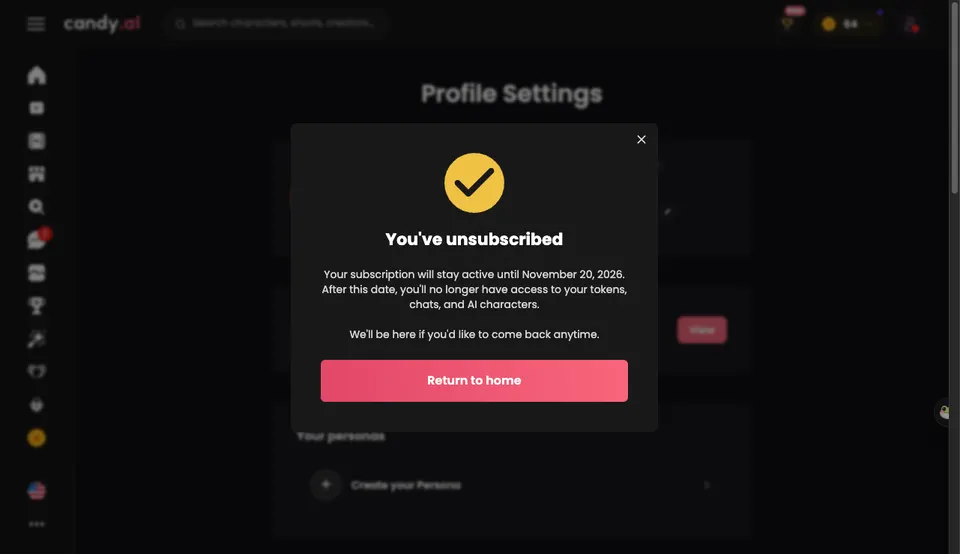
The final dialog said:
“You’ve unsubscribed. Your subscription will stay active until November 20, 2026. After this date, you’ll no longer have access to your tokens, chats, and AI characters.”
That is the confirmation to save. When I re-checked the account on 6 November 2026, Settings showed Current Plan: Premium (Canceled) and Subscription ends: 20.11.2026 (14 days left).
How to delete your Candy AI account
On 6 November 2026, Settings → Danger Zone contained a Delete account button described as permanently deleting the account and all of its data.
I did not delete my account, so I cannot tell you from first-hand evidence how deletion affects an active subscription, whether support can restore it, or how long server-side data remains. Treat it as a separate permanent privacy action, not as a casual substitute for Unsubscribe. If you only want to stop the next payment, cancel first and keep the confirmation. If you also want your data removed, contact support and use the Danger Zone control deliberately.
What happens to tokens, chats and characters after cancelling?
In my test, Premium remained usable during the paid month. On 6 November—17 days after cancelling—the Gallery was still accessible and the plan was still active until 20 November. The warning was about the end of the billing period, not an immediate wipe.
Do not confuse that grace period with permanent retention. Candy AI’s own final dialog says access to tokens, chats and AI characters ends after that date. Download or save anything you are allowed to keep before the period ends, and do not assume an annual plan works differently without checking the current terms.
Does cancelling Candy AI issue a refund?
No—not automatically. Cancellation stops the next renewal; a refund is a separate support request. I did not request one, so I am not going to invent an outcome. If you were charged after cancelling, keep the “You’ve unsubscribed” confirmation and contact support with the date, amount and descriptor.
My own card notice read “EverAI candy.ai MT” for $9.99 on 20 October 2026. The EverAI descriptor page explains why the charge may not look like a simple “Candy AI” line on your statement.
Bottom line
For a normal web card subscription, the path is My Profile → Settings → Unsubscribe → choose a reason → Confirm unsubscribe → save the confirmation. You keep access until the paid period ends, but Candy AI says tokens, chats and characters go after that date. Delete Account is a separate permanent action in Settings → Danger Zone, and a refund is a separate support request—not something cancellation guarantees.
Read the full Candy AI paid review or check the current Candy AI plans before you subscribe again.
Questions people ask
How do I cancel my Candy AI subscription?
On the web, open My Profile → Settings → Current Plan → Unsubscribe. Choose 'Yes I want to Unsubscribe', select a reason and press Confirm, then choose 'Confirm unsubscribe' on the content-loss warning. We completed this on 20 October 2026; the final screen said 'You've unsubscribed' and access stayed active until 20 November 2026.
Does cancelling Candy AI give me a refund?
Cancelling stops the next renewal; it is not the same as a refund. We did not request a refund, so we cannot confirm a refund outcome. If you believe a charge is wrong, contact Candy AI support and check the current refund policy rather than assuming cancellation reverses it.
What happens to my Candy AI tokens, chats and characters when I cancel?
Our warning screen said we would lose 64 tokens, 5 chats and 1 AI character at the end of the billing period. The final confirmation said the subscription stayed active until 20 November 2026, and after that date we would no longer have access to tokens, chats and AI characters.
Where is Delete Account on Candy AI?
Open Settings and scroll to Danger Zone → Delete account. On 6 November 2026 this was a permanent account-deletion control with no full-account data export option beside it. We did not delete our own account, so we cannot verify what happens to billing or content after deletion from first-hand evidence.
Should I delete my Candy AI account just to stop renewal?
No. Use Unsubscribe for a normal cancellation and save the confirmation. Delete Account is a separate permanent action for removing your account and data. If you are unsure about an active subscription, cancel it first and contact support before deleting the account.
What does Candy AI look like on my bank statement?
Our 20 October 2026 $9.99 charge read 'EverAI candy.ai MT'. The plans page had promised 'EverAI', but the actual notice also included candy.ai. If you are trying to identify a charge, match that string rather than looking only for the word Candy.
Can I cancel Candy AI on my phone?
If you subscribed on candy.ai with a card, sign in to the same web account in your mobile browser and use My Profile → Settings → Unsubscribe. If you paid through Apple or Google Play instead, cancel that store subscription in the store's own subscription settings. My screenshots are from a web card subscription.
Sources
- Our Candy AI web cancellation screenshots: Are you sure, required reason, content-loss warning, and You've unsubscribed confirmation (20 October 2026)
- Our $9.99 Candy AI Premium card charge, descriptor EverAI candy.ai MT (20 October 2026)
- Candy AI Settings → Danger Zone → Delete account, checked while the cancelled plan remained active (6 November 2026)
- Candy AI Settings → Current Plan: Premium (Canceled), Subscription ends 20.11.2026 (6 November 2026)
Keep reading
- AI Girlfriend Selfie Consistency Tested (2026): Context Blindness, Illegible Notes, and a Broken NSFW Blur SwitchWe asked nine paid AI companions for three selfies across three scenes: a couch after work, an explicit bedroom moment, and a 'prove you're home' mirror shot. We checked every file's resolution, face lock, and scene accuracy—and caught SpicyChat's 'Blur explicit images' toggle failing to blur a topless photo because its API tagged it is_nsfw: false.
- EroLove Review: The Best Memory I've Used, and Four Bugs They Fixed in 48 HoursEroLove's CTO asked us to test his app and turned Premium on for a month. I sent the same six messages, read its 179 KB chat bundle, and found four bugs: Estonian/French memory drift, silent blocked photos, 30 pages promising a 404 upload endpoint, and an unprinted 800/day cap. On 26 October he fixed all four and we re-tested.
- How Much Does Kindroid Cost? $13.99 on the Web, $15.99 in the iPhone AppPay on the web. Kindroid's Standard plan is $13.99 a month at kindroid.ai but $15.99 through Apple's US App Store, and the Ultra and MAX add-ons cost 15 to 16% more in the app. Here are the prices from the web checkout, the App Store listing and Kindroid's own code, and the one case where starting in the app makes sense.